






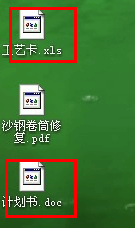
问题原因:
导至出现这种问题的原因基本上都是由于安装了其它的办公软件(比如:WPS),没有正常卸载导至;就算是重新安装Office也无济于事。
解决办法:
1:修改注册表相关项
Word文档:
KEY_CLASSES_ROOT\Word.Document.8\DefaultIcon 默认值改为: C:\Windows\Installer\{90120000-0011-0000-0000-0000000FF1CE}\wordicon.exe,1
KEY_CLASSES_ROOT\Word.Document.12\DefaultIcon 默认值改为: C:\Windows\Installer\{90120000-0011-0000-0000-0000000FF1CE}\wordicon.exe,13
Excel工作表:
HKEY_CLASSES_ROOT\Excel.Sheet.8\DefaultIcon 默认值改为: C:\Windows\Installer\{90120000-0011-0000-0000-0000000FF1CE}\xlicons.exe,28
HKEY_CLASSES_ROOT\Excel.Sheet.12\DefaultIcon 默认值改为: C:\Windows\Installer\{90120000-0011-0000-0000-0000000FF1CE}\xlicons.exe,1
PowerPoint演示文档:
HKEY_CLASSES_ROOT\PowerPoint.Show.8\DefaultIcon 默认值改为: C:\Windows\Installer\{90120000-0011-0000-0000-0000000FF1CE}\pptico.exe,17
HKEY_CLASSES_ROOT\PowerPoint.Show.12\DefaultIcon 默认值改为: C:\Windows\Installer\{90120000-0011-0000-0000-0000000FF1CE}\pptico.exe,10
2:删除注册表相关项,然后运行office安装程序修复
2.1 删除
Word文档:
HKEY_CLASSES_ROOT\.docx
KEY_CLASSES_ROOT\Word.Document.12
HKEY_CURRENT_USER\Software\Microsoft\Windows\CurrentVersion\Explorer\FileExts\.docx
HKEY_CLASSES_ROOT\.doc
KEY_CLASSES_ROOT\Word.Document.8
HKEY_CURRENT_USER\Software\Microsoft\Windows\CurrentVersion\Explorer\FileExts\.doc
Excel工作表:
HKEY_CLASSES_ROOT\.xlsx
KEY_CLASSES_ROOT\Excel.Sheet.12
HKEY_CURRENT_USER\Software\Microsoft\Windows\CurrentVersion\Explorer\FileExts\.xlsx
HKEY_CLASSES_ROOT\.xls
KEY_CLASSES_ROOT\Excel.Sheet.8
HKEY_CURRENT_USER\Software\Microsoft\Windows\CurrentVersion\Explorer\FileExts\.xls
PowerPoint演示文档:
HKEY_CLASSES_ROOT\.pptx
KEY_CLASSES_ROOT\PowerPoint.Show.12
HKEY_CURRENT_USER\Software\Microsoft\Windows\CurrentVersion\Explorer\FileExts\.pptx
HKEY_CLASSES_ROOT\.ppt
KEY_CLASSES_ROOT\PowerPoint.Show.8
HKEY_CURRENT_USER\Software\Microsoft\Windows\CurrentVersion\Explorer\FileExts\.ppt
2.2 修复
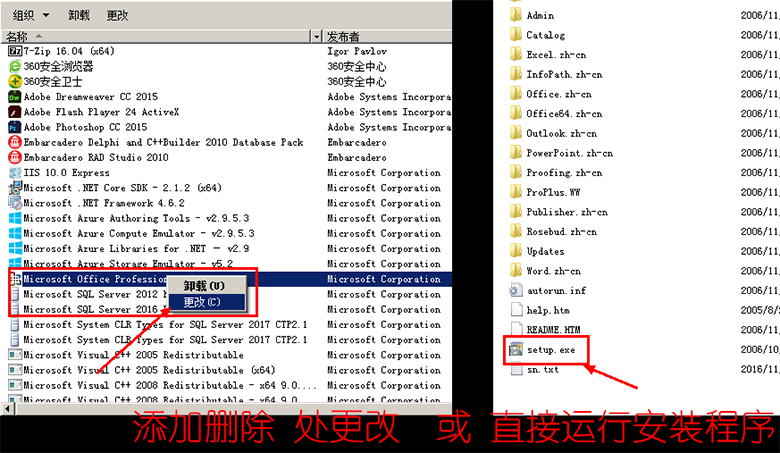
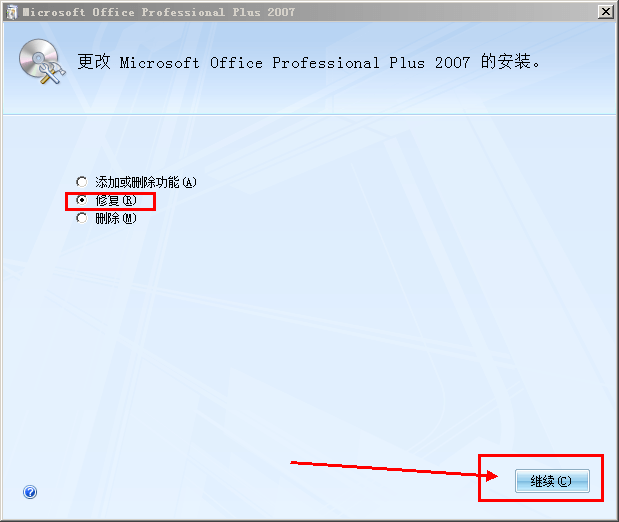
最后重启计算机使更改生效。
3:重新安装WPS,然后正常卸载(推荐使用,简单方便)。