




【系统版本】
cat /etc/.productinfo
NeoKylin Linux Advanced Server
Release 7.0
Zhaoxin
Build03/20190920
【配置步骤】
1.编辑配置文件
vim /etc/gdm/custom.conf
添加下面内容,然后重启系统:
[security]
DisallowTCP=false
AllowRemoteRoot=true
#
[xdmcp]
Enable=true
2.配置防火墙,放行udp协议177端口
firewall-cmd --permanent --add-port=177/udp
firewall-cmd --reload
3.客户机打开xmanager软件,点击“文件”–>“新建”–>“XDMCP 会话 (X)”
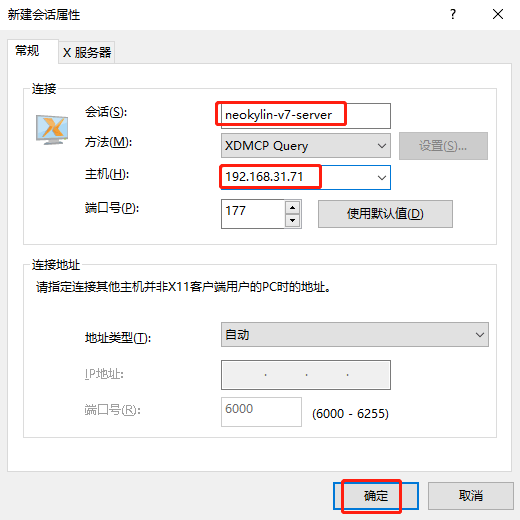
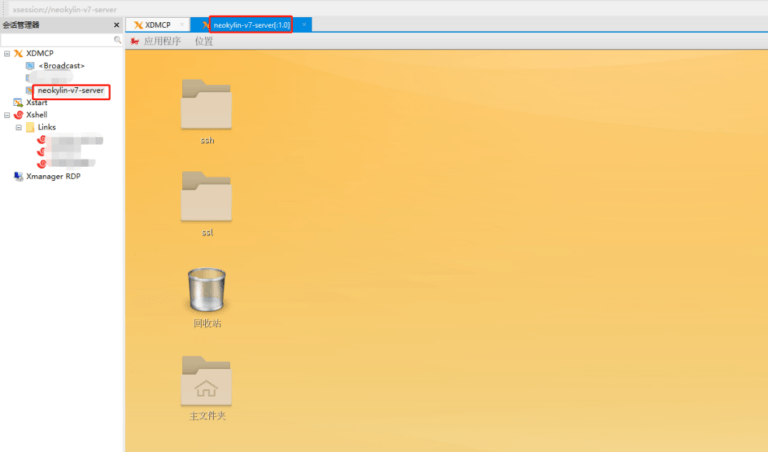
4.新建好会话后,双击可连接远程桌面,正常连接如下图所示: